Counter-Terrorism · Protect & Prepare

Protect the venue. Never watch the people.

OAK Protect & Prepare is decision support for the people who keep stadiums, transit hubs, government buildings and public events safe. It builds the venue's risk picture, plans protective measures within the budget, fuses sensor and staff reports into a corroborated site warning, sets the threat level and alert state, plans the response, and runs live in the control room during the event, with a tamper-evident incident log. Four red lines are enforced in code.

UNCLASSIFIED · representational // protective security and incident response only — no person-level targeting, no device-construction content
8
attack scenarios scored per venue
2 kinds
of sensor must agree before RED
4
red lines, refused in code and self-checked
Offline
by default · no GPU · air-gap-friendly
Red lines

What it will never do, and how you can check

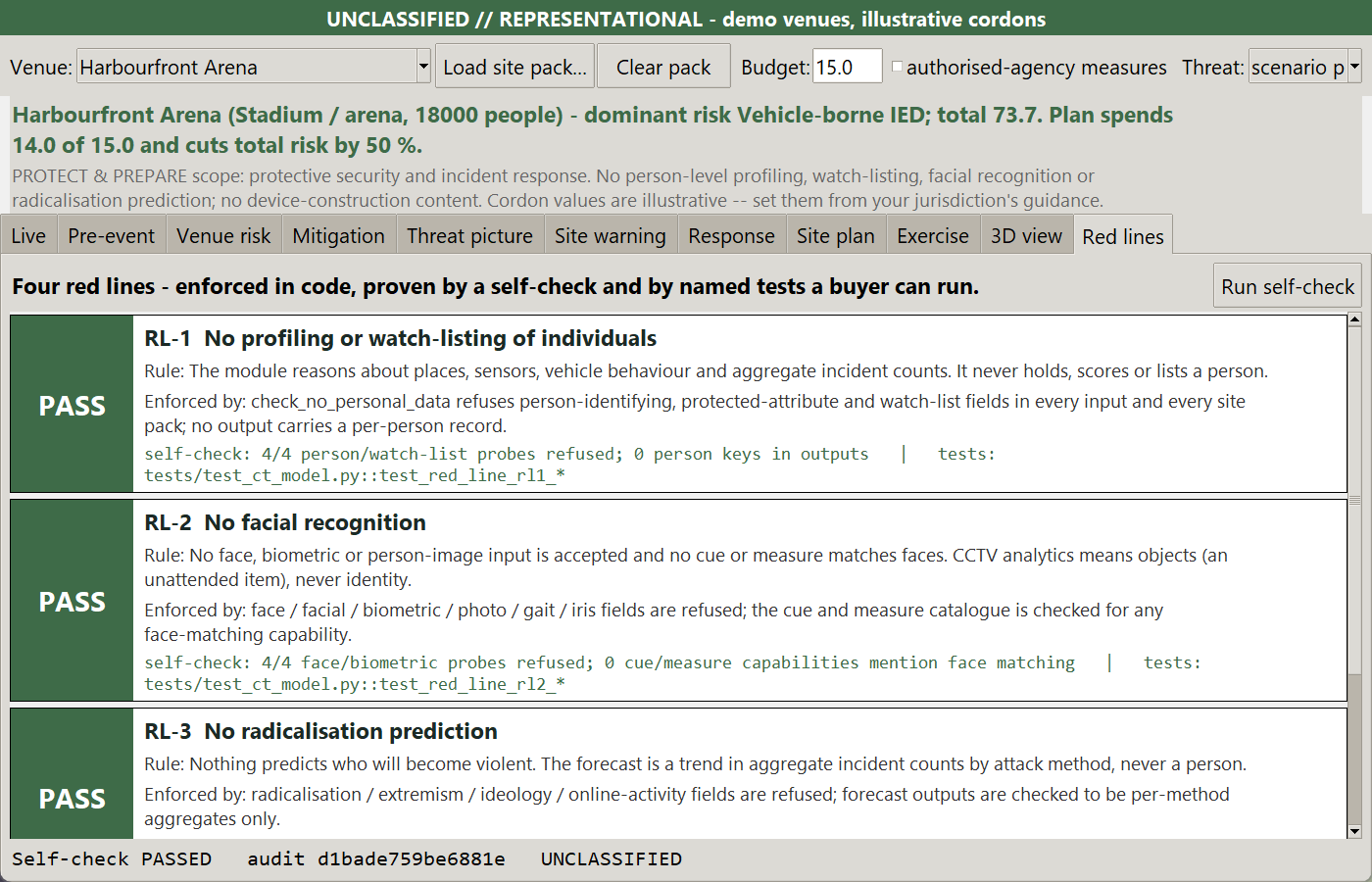
Counter-terrorism tools stall at privacy and legal review when nobody can see what they do with information about people. Here each red line is refused at every input, proven by named automated tests, and re-checked live on the app's Red lines tab, which shows PASS or FAIL with an audit hash.

RL-1No profiling or watch-listing

Fields that identify a person, record a protected attribute or form a watch-list are refused, including nested records and name variants.

RL-2No facial recognition

Face, photo and biometric fields are refused, and no sensor cue or measure performs face matching.

RL-3No radicalisation prediction

Ideology and online-activity fields are refused. The forecast counts incidents by attack method, never people or beliefs.

RL-4No IED construction content

Module text, every generated exercise and plan, and every customer site pack are scanned. Content that fails is refused.

Protect & Prepare

One venue, from risk picture to live response

Live in the control room

Staff and sensors report cues with a place and a time; the warning and alert state update at once; every decision is recorded by role or call sign in a hash-chained incident log. Operational mode needs your site pack and will not show illustrative cordons as guidance.

Venue risk

Threat × vulnerability × consequence for each of 8 scenarios, from vehicle-borne IED to drone and CBRN release, for 12 kinds of venue. You can see why a scenario ranks high, not only that it does.

Budgeted measure plan

Protective measures are ranked by risk cut per unit of cost until the budget is spent. Measures that only authorised agencies may operate in Canada (drone mitigation, RF countermeasures) are flagged and off by default.

Corroborated site warning

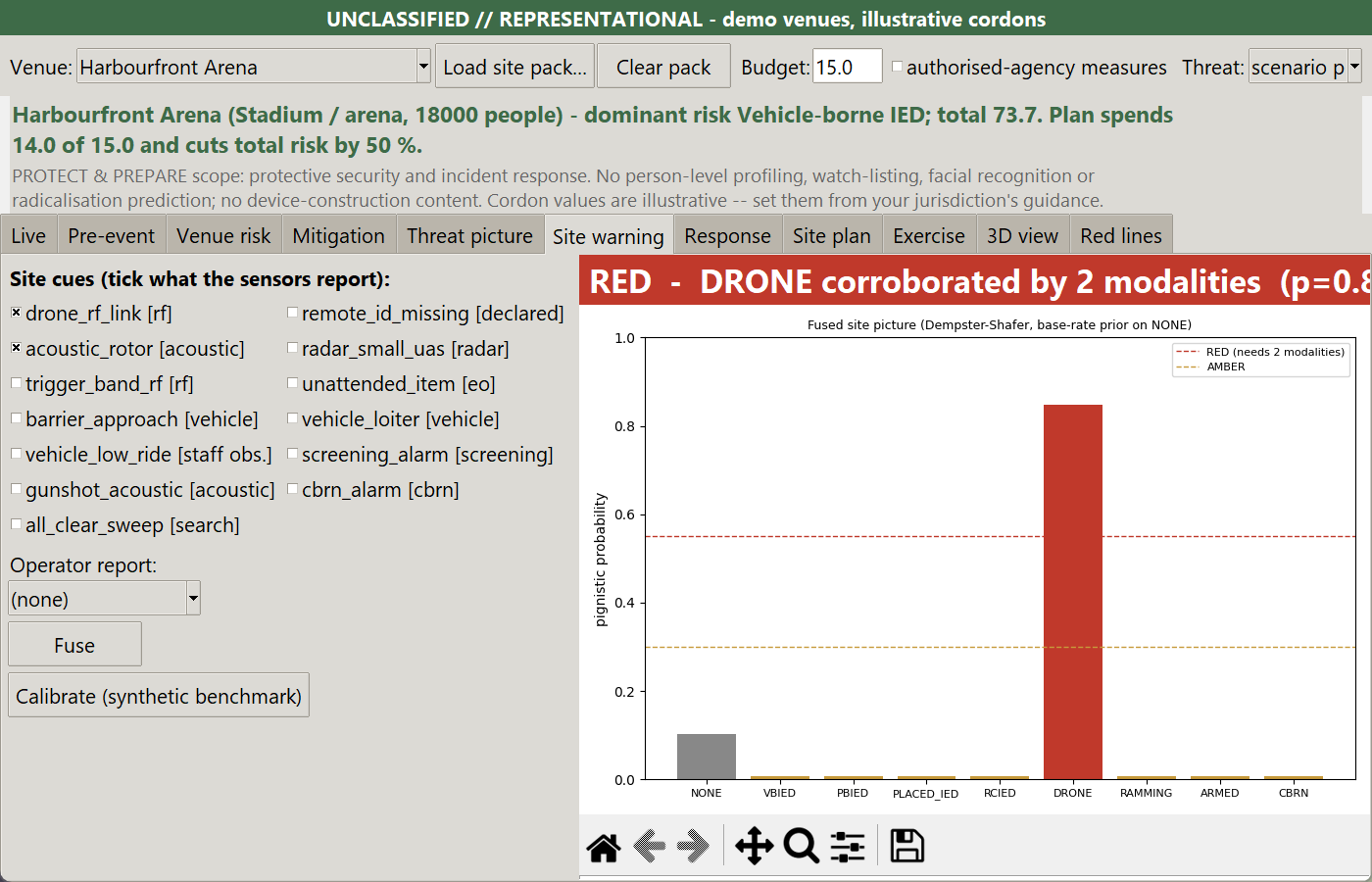
Sensor and staff reports are fused with Dempster-Shafer evidence. RED needs two independent kinds of sensor, and contradictory cues return VERIFY instead of a guess. The false-alarm threshold is calibrated statistically.

Threat level & alert state

The area threat level (LOW to HIGH) and the alert state (NORMAL to DELTA) follow JP 3-26 (2020). They are set separately, as the doctrine requires, and a corroborated site warning can raise the alert.

Response planning

Inner and outer cordons, the CBRN hazard area, an upwind casualty collection point, and a check that responder radios do not sit in counter-RCIED bands.

Tabletop exercises

Timed injects for each scenario, the decision put to the players at each step, what the system would be saying at that moment, and a scoring rubric.
Site warning

One sensor raises AMBER. Two kinds of sensor raise RED.

  • Drone RF link, Remote ID, acoustic, radar, vehicle behaviour, unattended-item analytics, gunshot acoustics, CBRN detectors and operator reports
  • When a cue cannot tell two scenarios apart, the warning names both: a vehicle at the barrier could be a VBIED or a ramming
  • Immediate protective actions for the leading scenario
  • Deterministic and audited: the same cues always give the same answer, with a hash you can quote
OAK Protect & Prepare: corroborated site warning for a drone, two sensor kinds agreeing
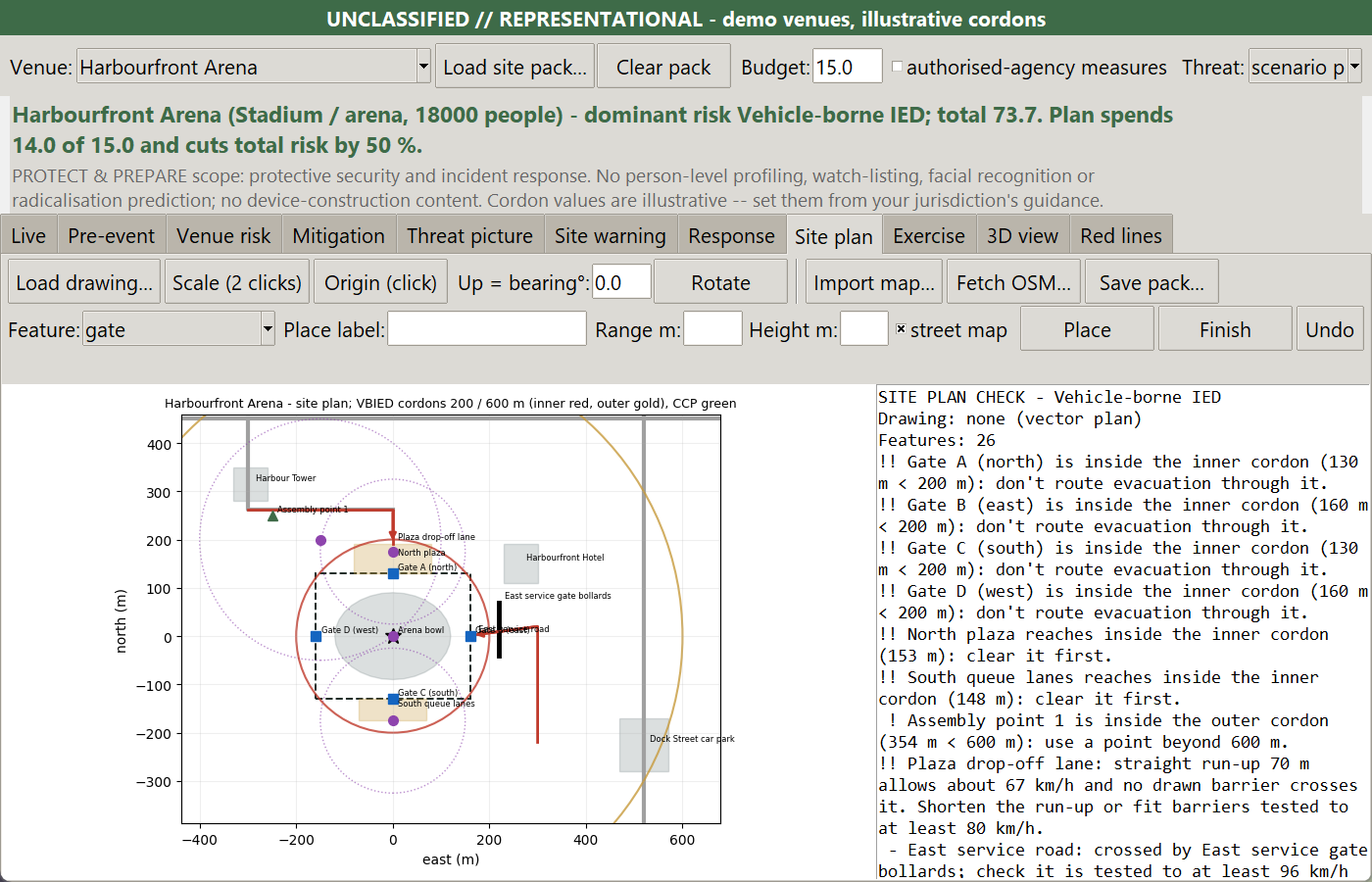
OAK Protect & Prepare: site plan with cordons, gates, vehicle approaches and barriers
Your own site plan

On your drawing, not a blank circle.

  • Load your site drawing (PNG, JPG or PDF) and set its scale, or import open map data for the venue you choose
  • Shows the gates and crowd areas a cordon cuts through, and assembly points that sit too close
  • For each vehicle approach: the straight run-up, the speed a vehicle could reach, the barrier test speed that matches, and whether a barrier crosses it
  • Nearest hospital, fire and police station, and how much of the perimeter your sensors cover
  • Stadiums, airport landside, trains, concert halls, festivals and trade shows, each with the measures that fit
  • The drawing lives in your site pack and carries your marking
What we say plainly

Sensors do not catch everything. Trained people do.

  • On our synthetic benchmark the site warning catches drones 95 % of the time when four kinds of drone sensor are fitted (about half with radar alone) and armed attacks 78 %, at a 1.5 % false-alarm rate. It almost never catches person-borne or placed IEDs from sensors alone. Those depend on trained staff and public reporting, so we pair the software with training.
  • The benchmark is synthetic. Your own sensors calibrate it during a pilot.
  • Cordon distances are illustrative until your jurisdiction's guidance is loaded as a site pack.
Your data stays controlled

Unclassified software. Your site pack carries the marking.

  • The software ships unclassified and runs offline. Optional open-map, basemap and terrain downloads ask first, and are refused once a controlled site pack is loaded
  • Real venue assessments, installed measures and local cordon guidance go into a site pack you hold
  • Loading a pack raises every output's marking to the pack's classification (for example PROTECTED B)
  • A tampered pack, or one carrying person fields or construction text, is refused with the reason
OAK Protect & Prepare: Red lines tab, four PASS results with evidence
How it fits

One chain, instead of six tools that don't talk

Venue security today is spread across separate tools, and each covers one step. Protect & Prepare is the planning layer that joins them, and it works with what you already have.

Compliance and risk forms

Keep them for the record. We compute the risk for each scenario, show which measures cut it most for the budget, and hand you the output to file.

Event-management platforms

They run the day. We plan the venue before the day, and set the warning and alert state the day acts on.

Blast and barrier engineering

Keep the physics with your engineer. Load their distances as a site pack and we plan across all eight scenarios around them.

Entry screening

A screening alarm is one of our sensor cues. On its own it is AMBER at most; with a second kind of sensor or a staff report it can reach RED.

Incident-command simulators

They rehearse the commander. We build the exercise from your venue's own risk picture and score every decision.

Tools that watch people

This is the one we don't fit with, by design. Profiling, face matching and radicalisation scoring are refused in code. That is what lets privacy review say yes.

Start with one venue

In a half-day session we build your venue's risk picture, plan measures within your budget, and run a scored tabletop exercise with your security, police and EMS leads. You keep the results.

Book a venue tabletop
Precision engineering for defence, aerospace & space — Kanata, Ontario, Canada